
Check, code and approve e-invoices.
Straight into JD Edwards.
FlexInvoice receives XRechnung and ZUGFeRD, checks them, finds supplier and purchase order in JDE and creates the voucher once approved.
- ✓ Schema
- ✓ EN 16931
- ✓ XRechnung 3.0
- ✓ Order in JDE
Items that stay open today
| Item | Description | Status |
|---|---|---|
| 1 | An XRechnung is an XML file. We print it and type it into JDE. | open |
| 2 | Nobody here checks whether an e-invoice actually follows the rules. | open |
| 3 | Approval runs by e-mail. Nobody knows where an invoice is stuck. | open |
| 4 | Our customers want XRechnung. JDE only prints PDF. | open |
The e-invoice becomes a JDE voucher.
Intake from folders, SFTP, mailboxes or Peppol. Checks against EN 16931 and XRechnung, coding from the supplier's previous vouchers, approval by your limits, voucher in JDE with the original attached. Outgoing, FlexInvoice turns JDE invoices into XRechnung, ZUGFeRD or Peppol.
Two modules. Incoming and outgoing.
Licensed separately or together. With both, FlexInvoice switches between incoming and outgoing at the top, just like here.
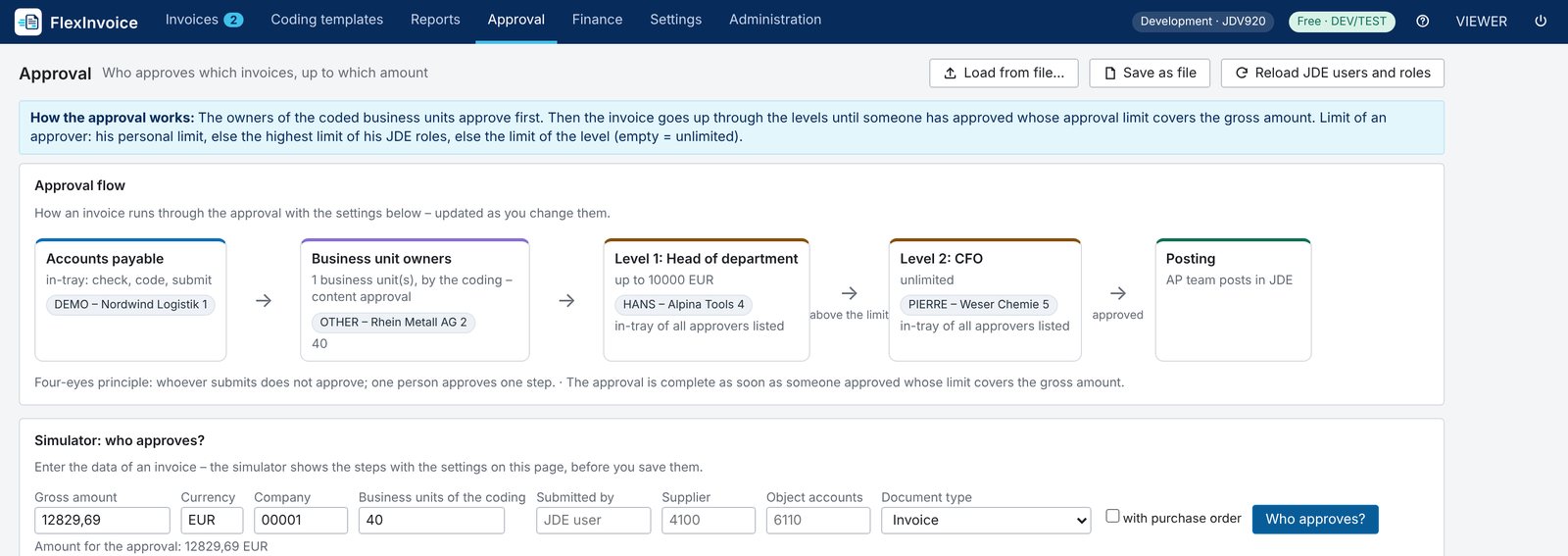
From the inbox to the posted voucher in JD Edwards, approved by your rules.
- 1Intake
- 2Check
- 3Match with JDE
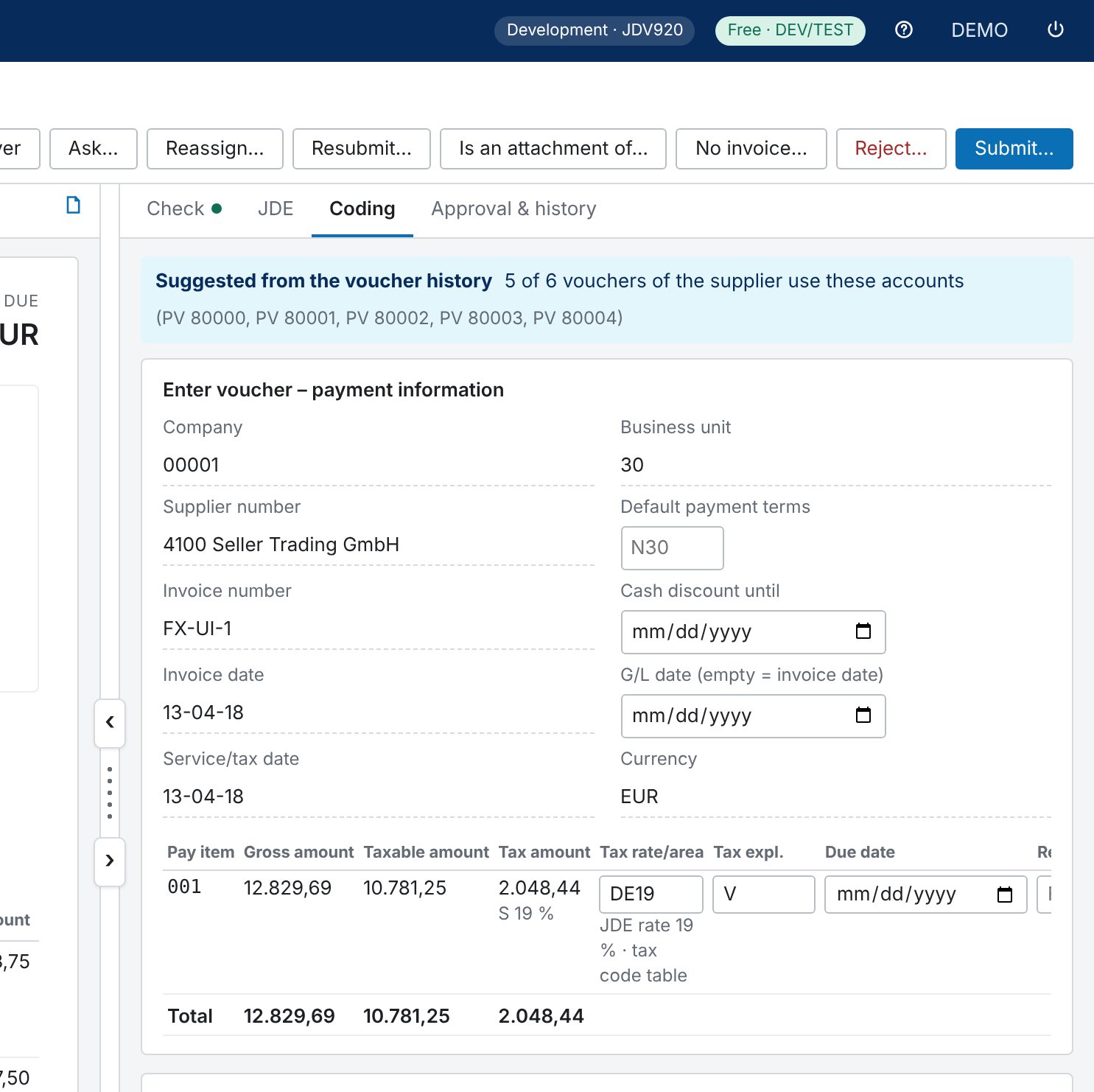
- 4Code
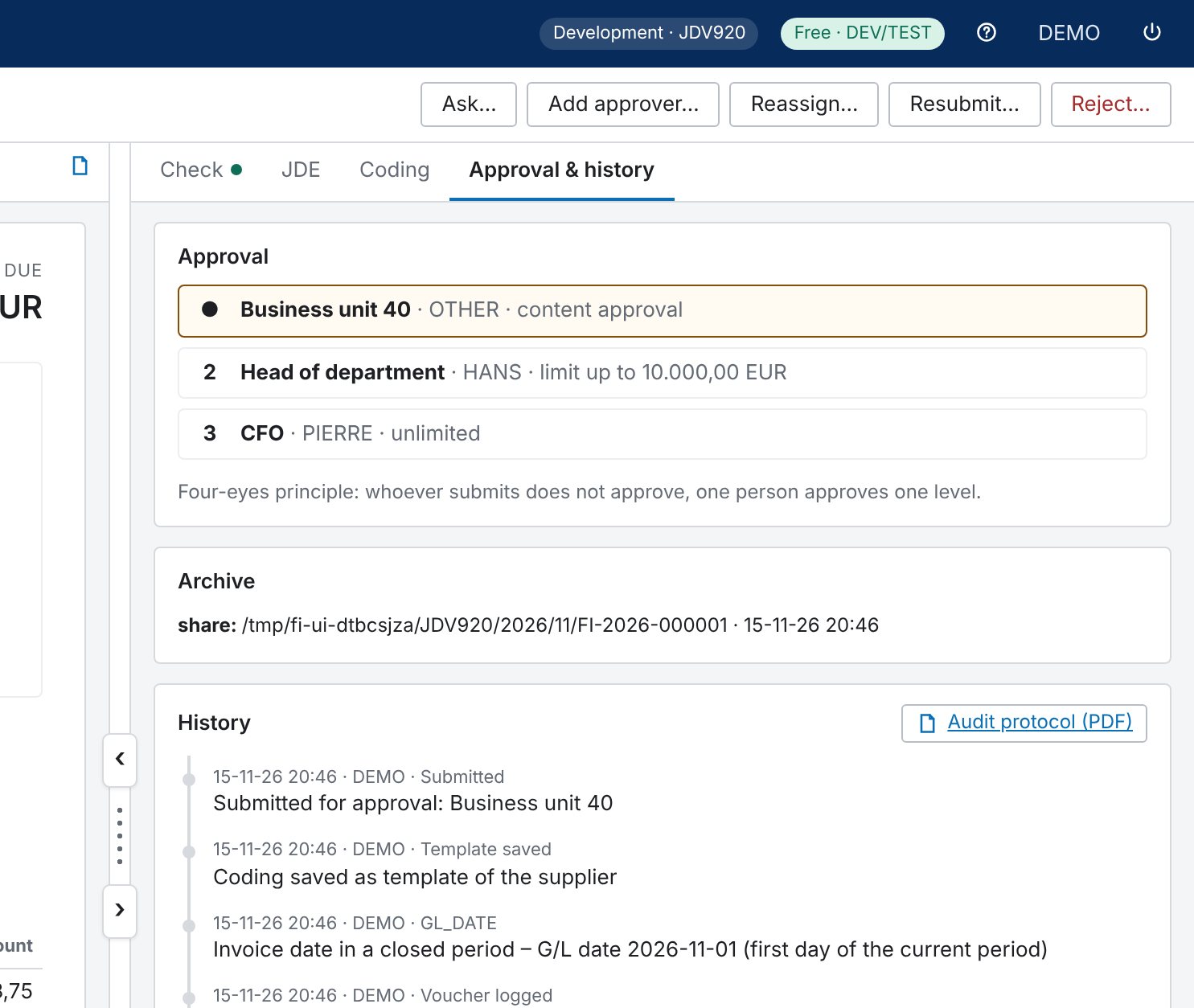
- 5Approval
- 6Voucher in JDE
Formats and channels
- XRechnung (UBL and CII), ZUGFeRD / Factur-X, Peppol BIS Billing 3.0
- FatturaPA (Italy) and KSeF (Poland)
- PDFs and scans: data is read out, with text recognition if you wish
- From folders, SFTP, mailboxes, Peppol or by upload
Check and match
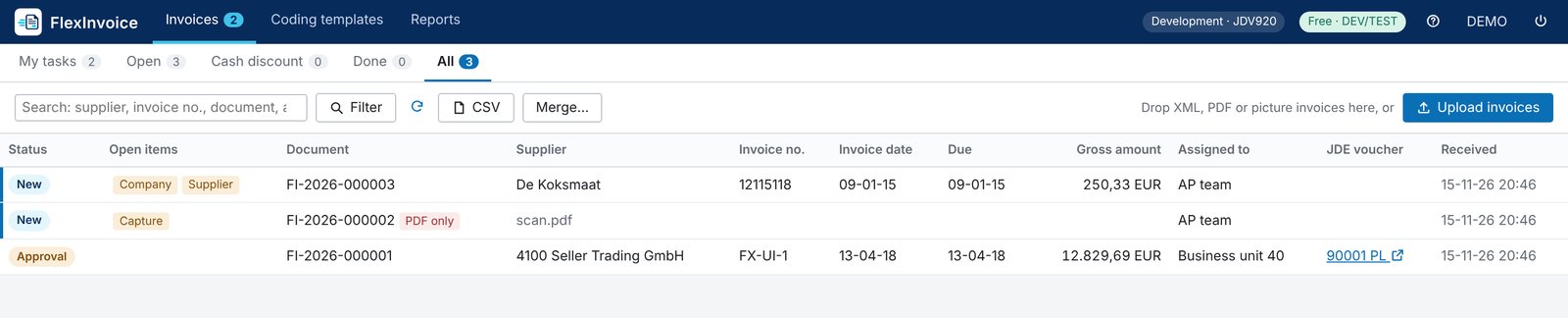
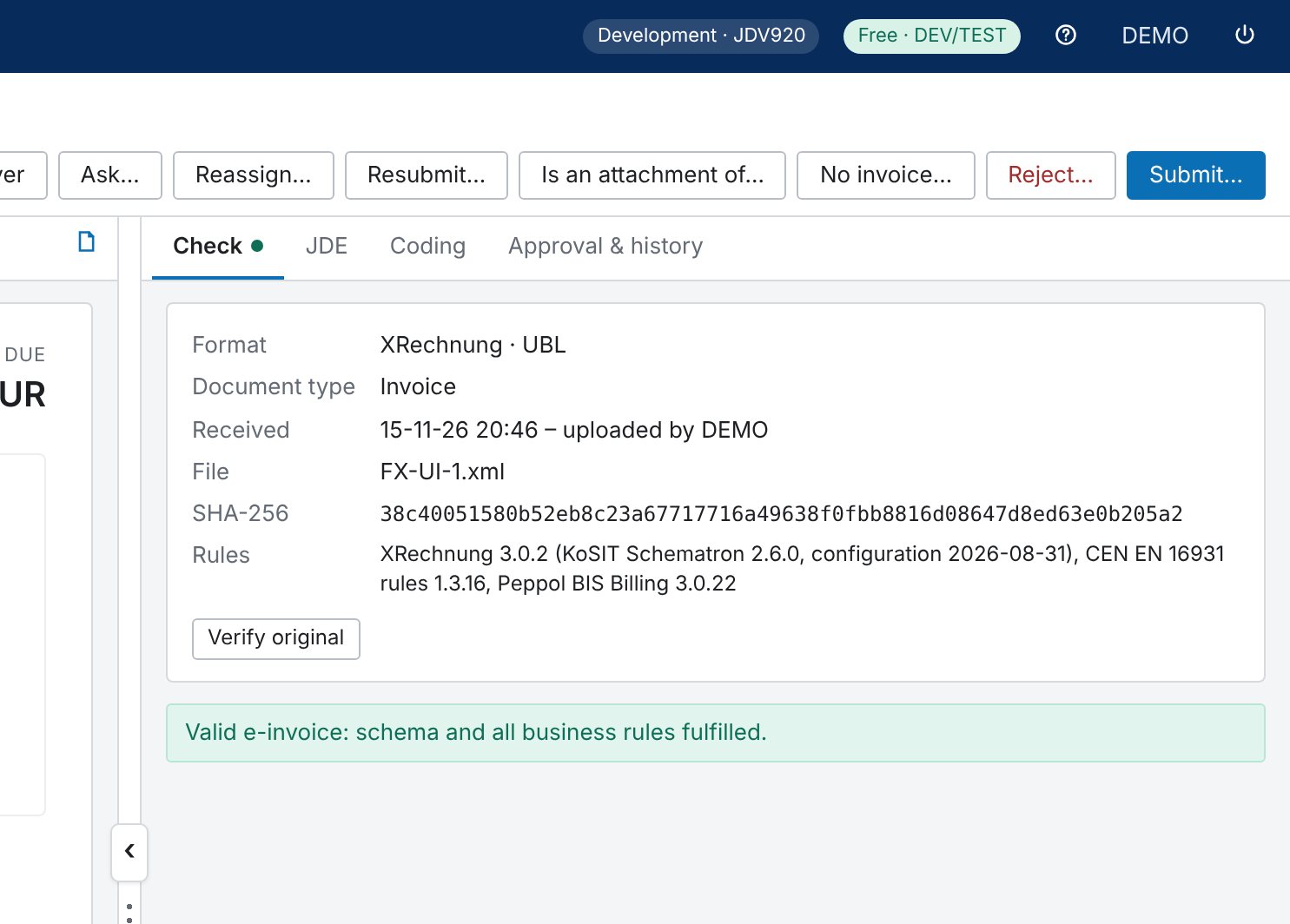
- Rules of EN 16931, XRechnung and Peppol, errors named clearly
- Company, supplier and purchase order are found in JDE
- Matching against receipts, with tolerances for quantity and price
- Warning on duplicate invoice numbers and on a changed IBAN
Coding
- Proposal from the supplier's previous vouchers
- Templates for recurring invoices
- Foreign currency at the JDE rate, cash discount and tax rates
Approval workflow
- First the cost-centre owners, then level by level until a limit covers the amount
- Limits per person, JDE role or level; shared inboxes
- Extra rules, e.g. IT purchases approved by the head of IT
- Query, send back, reject, deputies and bulk approval
- Four eyes: whoever submits does not approve
Posting and evidence
- Voucher in JDE through an orchestration, original attached
- Invoice register and key figures, e.g. discount taken and lost
- Data package for the tax audit, readable with IDEA
- Read-only access for auditors
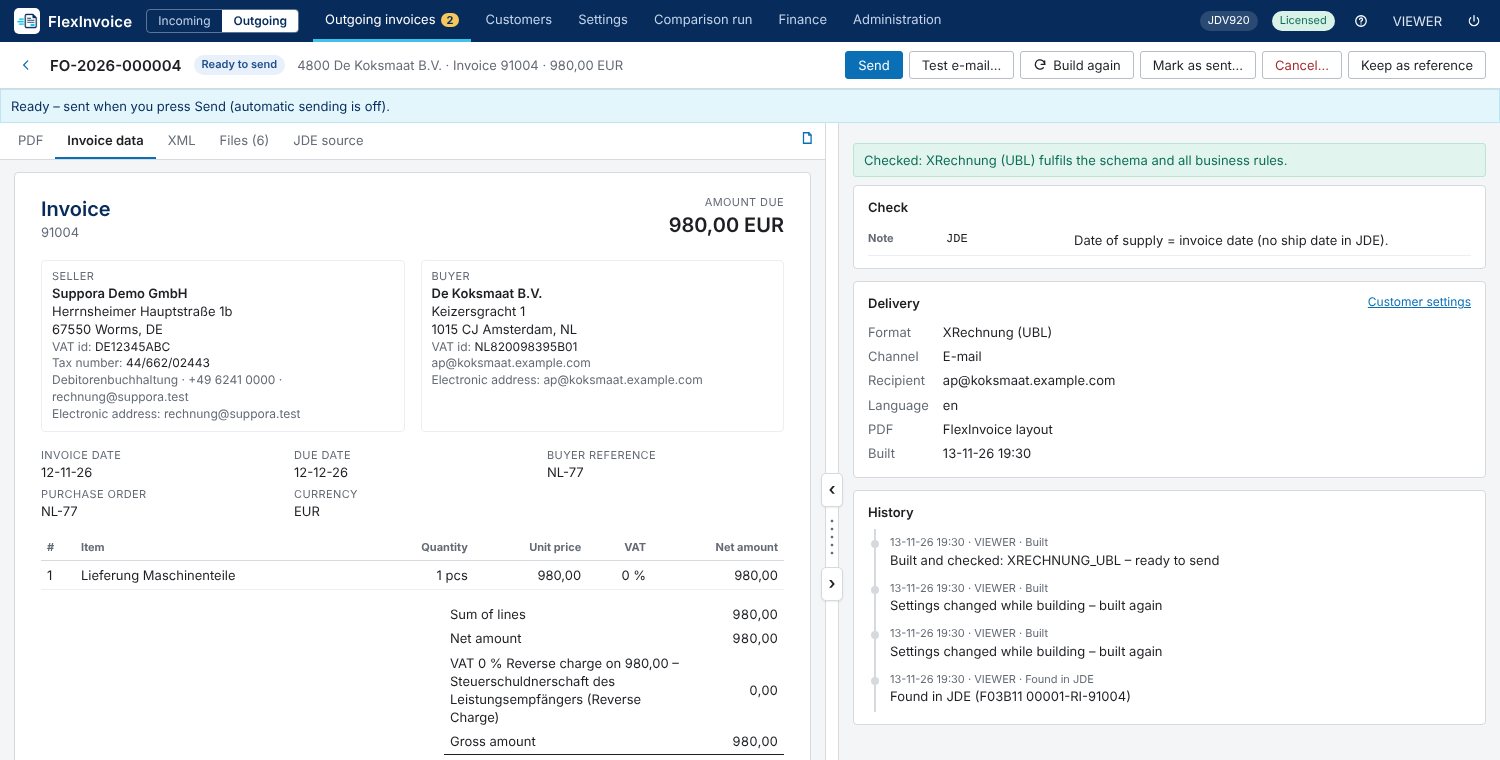
Your JDE invoices become e-invoices, checked and delivered to every customer the way they need.
- 1Invoice in JDE
- 2Create e-invoice
- 3Check
- 4Approval (optional)
- 5Delivery
- 6Archive
Source in JDE
- Sales order lines (F42119 / F4211) or receivables (F03B11 / F0911)
- New invoices appear on their own, every few minutes
- Corrections always by a credit note from JDE, sent the same way
Formats
- XRechnung, ZUGFeRD / Factur-X (PDF/A-3) and Peppol BIS
- Your familiar invoice layout: the PDF of your JDE print (BI Publisher) becomes a ZUGFeRD invoice
- Or FlexInvoice's own layout with logo and footers
Checks before sending
- The same rules as for incoming invoices
- If something is missing, e.g. a buyer reference or e-mail address, the invoice is listed under problems
- Approval before sending: project manager, then management
Delivery
- By e-mail, Peppol, file share or customer portal
- Format and channel per company, different per customer
- E-mail texts in the customer's language
- Test e-mail to your own address; a test system never sends to customers
Evidence
- Delivery status and every attempt in the history
- Archive with everything sent, including the e-mail
Checks on the way to the voucher
Corrections
| Voucher from the e-invoice | |
| Checked against EN 16931 and XRechnung | |
| Workflow with history | |
| XRechnung, ZUGFeRD, Peppol |
Terms
- Modules
- Incoming and outgoing licensed separately
- Access
- Through AIS with the JDE user, no table writes
- Archive
- File share, SFTP, S3, SharePoint and more
- Runs on
- Your server, Windows or Linux
Everything FlexInvoice does
25 features
Incoming and outgoing are two modules, licensed separately or together. Features without a tag belong to the incoming module.
Every e-invoice format
XRechnung (UBL, CII), ZUGFeRD / Factur-X, Peppol BIS 3.0, FatturaPA, KSeF.
PDFs and scans
Data is read out, also by text recognition; uncertain fields are marked.
Intake channels
Folders, SFTP, mailboxes, Peppol access point, upload; ZIP attachments are unpacked.
Attachments sorted
Further PDFs in a mail are recognised as an attachment or an invoice of their own.
E-invoice rules
EN 16931, XRechnung and Peppol, every violation explained.
Supplier and order in JDE
Company, supplier and purchase order are found, assignments learned.
Receipts matching
Quantity and price against received quantities, with tolerances.
Protection against fraud and double payment
Changed IBANs and duplicate invoice numbers stand out.
New supplier
Request straight from the invoice, with approval.
Proposal from history
From the supplier's previous vouchers.
Templates and recurring invoices
Recurring coding in one click.
Foreign currency and discount
At the JDE rate, discount deadlines in view.
Levels up to the limit
Cost-centre owners, then levels until a limit covers the amount.
Shared inboxes and deputies
Several approvers share an inbox; deputies cover absence.
Extra rules
e.g. IT purchases by the head of IT, invoices without an order by purchasing.
Approval by mail link
Approve, send back, query, reject; also in bulk.
Approval simulator
Shows in advance who approves which amount.
E-invoices from JDE
From sales order lines or receivables, automatically every few minutes.
Outgoing moduleYour invoice layout stays
The PDF of your JDE print becomes a ZUGFeRD invoice.
Outgoing moduleThe right channel per customer
E-mail, Peppol, file share or portal; buyer reference for public authorities.
Outgoing moduleApproval before sending
Project manager, then management.
Outgoing moduleOriginal with checksum
Every invoice unchanged with SHA-256, every step in the history.
Invoice register
With totals per currency, as CSV for Excel.
Data package for the tax audit
In the tax authority's description standard, readable with IDEA.
Auditor access
Read-only, time-limited.
Nothing found. Ask us directly whether FlexInvoice can do it.
Your path with FlexInvoice
FlexInvoice measures your progress itself: days from receipt to posting, share posted without correction, discount taken and lost.
- Stage 1
Everything in one place
E-invoices, PDFs and scans land in one list.
Your progressNo invoice gets lost any more. - Stage 2
No typing
Data, supplier and order come from the invoice and from JDE.
Your progressAccounting checks instead of typing. - Stage 3
Approval in flow
Approvers get a link, shared inboxes and deputies step in.
Your progressDiscount deadlines are kept. - Stage 4
Audit-proof
Invoice register and tax-audit data package at the push of a button.
Your progressThe audit is no longer a project.
E-invoicing is mandatory. In both directions.
- ReceivingSince 1 January 2025 every business in Germany must be able to receive e-invoices.
- Issuing, phase 1Mandatory for companies with more than €800,000 turnover in the previous year.
- Issuing for everyoneMandatory for all companies.
Across Europe, EN 16931 and Peppol are becoming the standard. FlexInvoice covers both directions.
FlexInvoice on video
The real product with demo data: the overview first, then incoming and outgoing invoices in detail. The licence for your test environment is free; implementation comes at a fixed price.
See FlexInvoice in your environment?
Tell us briefly what it is about. We will get back to you within two working days.