
OPEROGUIDE · AI ASSISTANT FOR JD EDWARDS
Guidance inside JDE. Exactly when users need it.
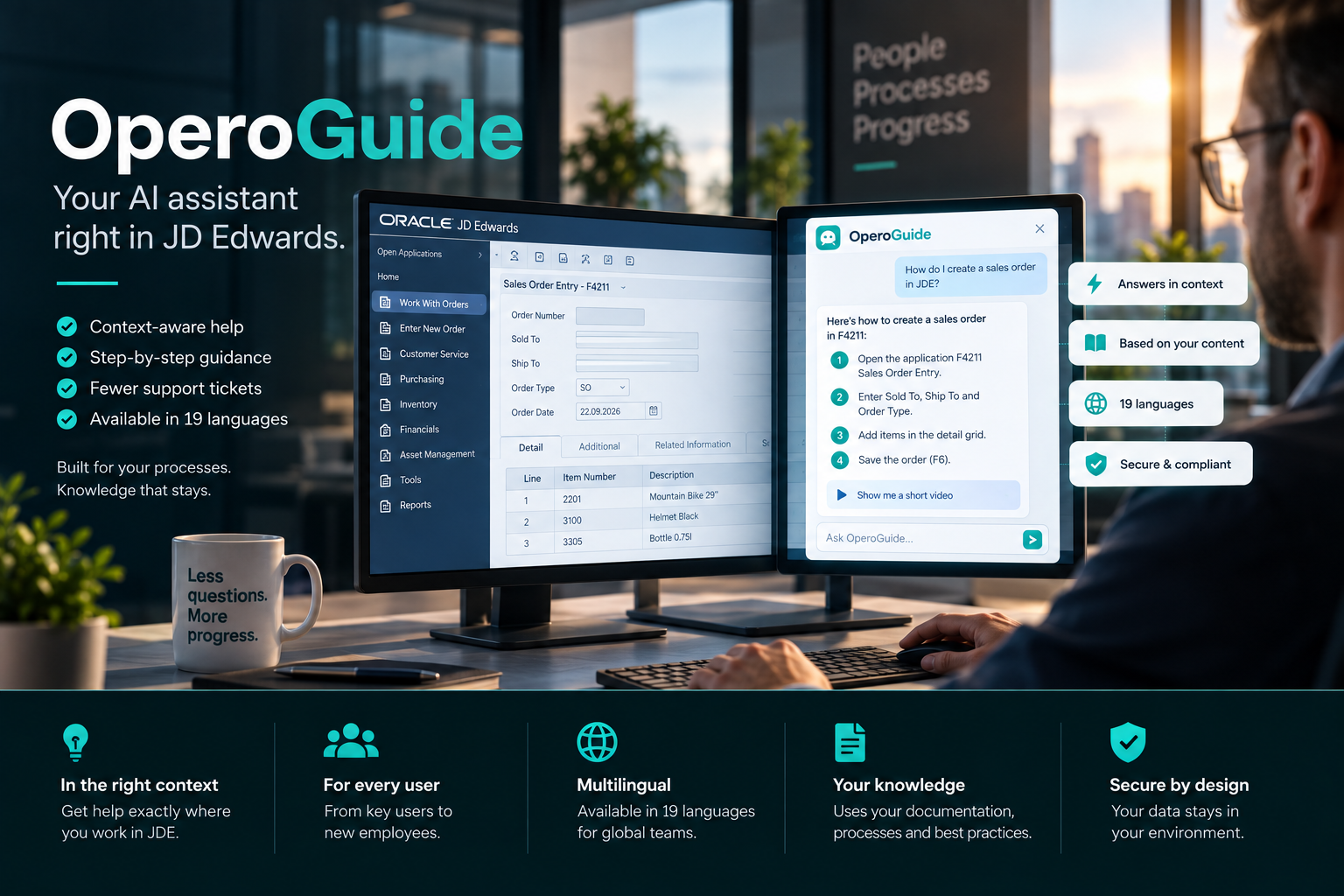
OperoGuide gives JD Edwards EnterpriseOne users context-aware answers, step-by-step guidance and access to company knowledge directly in the JDE browser experience.
OPEROGUIDE · JDE CONTEXT
Help inside the working process
WHY OPEROGUIDE
The knowledge already exists. Users just need it in the right moment.
JDE expertise often sits with a handful of experienced users, in training documents, runbooks and internal process notes. That creates delays whenever someone has to stop, search, ask or open a ticket.
OperoGuide brings that knowledge into the JDE working context. It recognizes the form a user is working in and provides answers and guidance without forcing them to leave EnterpriseOne.
Watch the demo
See OperoGuide inside a real JDE workflow.
A short walkthrough shows how OperoGuide appears in the working context, how answers are delivered and what deployment looks like.You are currently viewing a placeholder content from YouTube. To access the actual content, click the button below. Please note that doing so will share data with third-party providers.
More InformationBuilt for everyday work in JD Edwards.
OperoGuide combines browser integration, JDE context and your own knowledge base in one focused assistant.Browser integration
Works in Chrome, Edge and Firefox and can be deployed centrally through enterprise browser policies.
JDE context
Recognizes the current EnterpriseOne form so answers and guidance match what the user is actually doing.
19 languages
Users ask in their own language and receive answers in that language, even if the underlying documentation is maintained in English.
Your knowledge base
Answers are grounded in runbooks, training material, process documentation and custom-object specifications.
Organisation-ready
Tenant separation and managed deployment support shared-service models, group structures and larger JDE user populations.
EU-hosted
Knowledge and queries can be processed in EU-hosted environments without sending JDE production data outside your infrastructure.
How it works
From browser extension to contextual JDE guidance.
No JDE customization is required. The extension connects users to a dedicated OperoGuide tenant and brings the relevant knowledge into the current JDE form.1
Install extension
Users add OperoGuide from Chrome Web Store, Edge Add-ons, or Firefox Add-ons. Or push via your IT policy.2
Connect tenant
One-time token connects the extension to your dedicated OperoGuide backend. Token is unique to your organisation.3
Open JDE
OperoGuide appears as a sidebar in any JDE form. Context is detected automatically — no setup per form.4
Ask & act
Users ask questions in their own language. OperoGuide answers from your knowledge base, scoped to the current JDE form.Use cases
Where contextual JDE guidance makes a difference.
OperoGuide is especially useful where knowledge gaps, onboarding time and repeated support questions slow down day-to-day JDE work.
Onboarding
New hires productive in days, not months.
A new employee opens JDE for the first time. Instead of shadowing a senior user for weeks, they get context-aware guidance directly in each form — in their own language.
Support reduction
Tickets that never get raised.
Most "how do I…" tickets come from users who can't find the right answer. OperoGuide gives the answer inside the JDE form — so the ticket never gets opened.
Multilingual workforce
One JDE, 19 languages.
Your JDE setup is in English. Your warehouse team in Hungary doesn't speak English. OperoGuide bridges that gap — they ask in Hungarian, get answers in Hungarian.
Knowledge continuity
The knowledge stays. Even when people leave.
Your senior JDE user moves on. Their know-how lives on in the knowledge base — accessible to everyone who needs it, right inside JDE.Which JDE versions are supported?
OperoGuide works with JD Edwards EnterpriseOne 9.2 across all Tools Releases that support modern web browsers. We don't require a specific Tools Release because the extension reads the rendered HTML — no server-side dependency.
Which browsers are supported?
Chrome (Manifest V3), Microsoft Edge (Manifest V3), and Firefox (Manifest V2). Distributed via the official browser extension stores, or via Group Policy / managed deployment for enterprise IT.
Where is data hosted? What about GDPR?
OperoGuide backend runs on IONOS Germany by default. The knowledge base is stored encrypted at rest. Queries are processed in the EU. We provide a full DPA (Auftragsverarbeitungsvertrag) on request.
Three deployment models are supported: EU Cloud (SaaS) on IONOS, On-premises in your data center or private cloud, or your own cloud (Azure, AWS, GCP) where we manage OperoGuide inside your existing hyperscaler tenant.
Critically: JDE production data never leaves your infrastructure. The extension reads page context but only sends the question text and relevant context tags to the AI — never database content.
How is the knowledge base maintained?
You provide your existing JDE documentation — runbooks, training material, custom-object specifications, internal wikis. We ingest, embed, and index it. Updates can be pushed continuously or in scheduled batches.
For Care customers, we maintain the knowledge base as part of the managed service. Standalone OperoGuide customers manage it themselves via our admin interface.
Can we try it before committing?
Yes — you can start a free trial directly on operoguide.ai, or we run a structured pilot with you. Initial setup typically takes 1–2 weeks, and a focused pilot (one JDE module, one department, one language) runs 2–4 weeks. Get in touch to scope a pilot.
How does pricing work?
OperoGuide is sized per user-base and knowledge-base scope. Care customers (Essential and above) include OperoGuide at no additional cost. Standalone customers can start self-serve on operoguide.ai or get a custom proposal — talk to us for a quote.
Does it integrate with our existing ticketing system?
Yes — when a user's question can't be answered confidently, OperoGuide can hand off to your help desk with the full context (JDE form, user query, attempted answers). Integrations available for Jira, Zammad, Zendesk, ServiceNow, and email.
OperoGuide datasheet
Feature scope, rollout sequence and how it integrates with your JDE environment, at a glance.See OperoGuide in your own JDE context.
The fastest way to evaluate fit is a short demo on a representative JDE form — we'll show you how OperoGuide behaves and what the rollout would look like for your team. Prefer to explore on your own? Start a free trial in minutes.OperoGuide is part of the Opero Suite and included in every Suppora Care tier from Essential up.