
OPEROSTUDIO · JDE DATA TOOLING
Understand JDE data. Build the model visually.
OperoStudio brings the JD Edwards schema into a visual workspace. Find tables and fields, understand relationships, build joins and turn the result into reusable extracts — without guessing your way through F-codes.
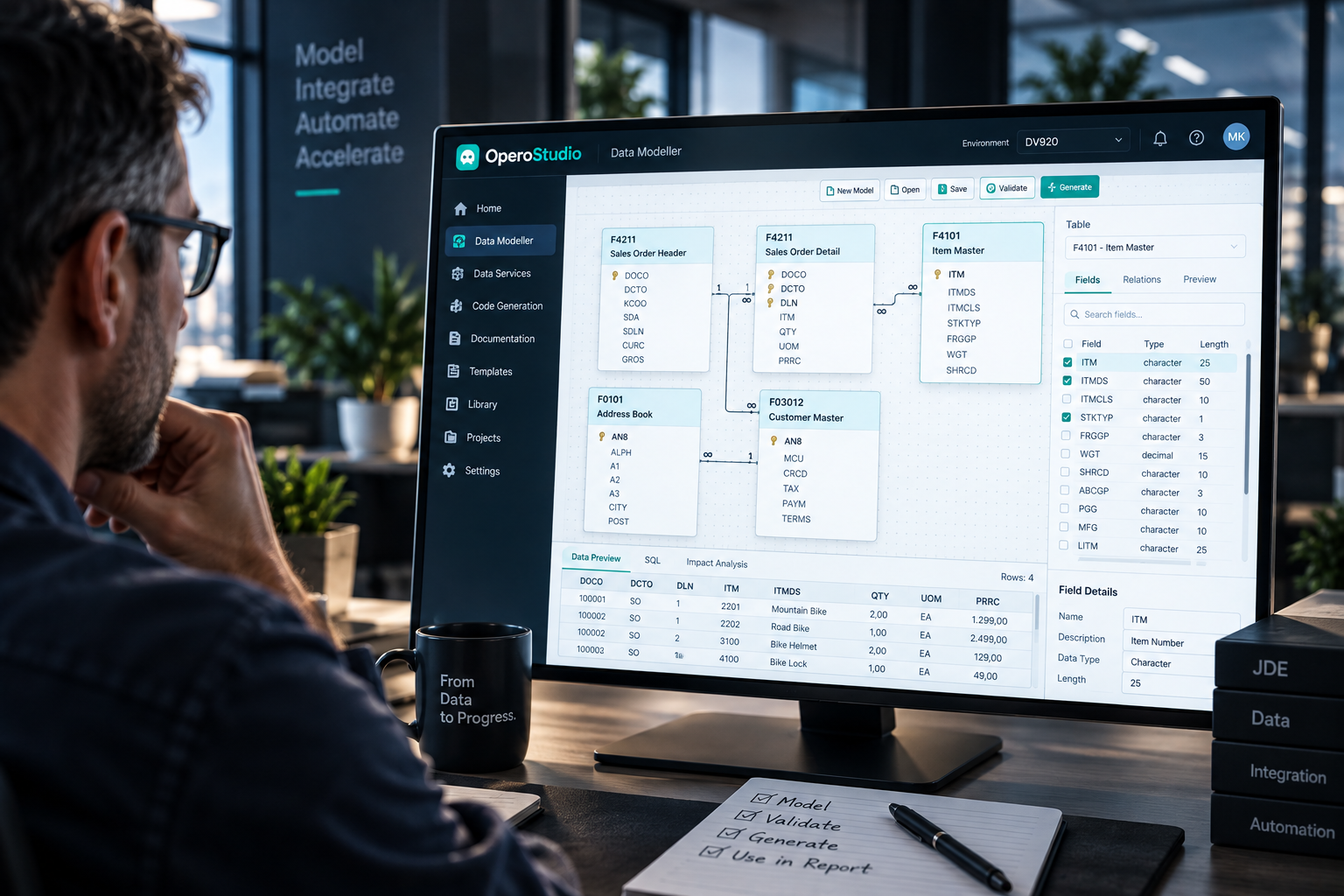
OPEROSTUDIO · DATA MODELLER
Tables, relationships, fields and preview in one workspace
WHY OPEROSTUDIO
JDE data makes sense once you can see the relationships.
Anyone who works with JD Edwards data knows the problem: the information is there, but understanding which tables, fields and joins belong together takes experience.
OperoStudio turns that knowledge into a visual model. The Data Modeller makes the JDE schema easier to navigate, while Extracts turns a finished model into usable data for reporting, analysis and downstream processes.
From F-table to understandable data model — without losing the technical JDE context.
Two modules
Two parts of the same JDE data workflow.
Start with the Data Modeller to understand and model JDE data. Use Extracts when that model needs to become a repeatable dataset.Data Modeller
DM01_MODELLER
Visual schema browser and data model designer. Understand what's in JDE, how it joins, and what to query.
- Full JDE schema pre-loaded with plain-language descriptions
- Visual model canvas with drag-and-drop joins
- Foreign-key detection and auto-suggested joins
- Models saved as portable .osm files, version-controllable
Extracts
EX01_EXTRACTS
Turn a Data Modeller model into a working data extract. CSV, JSON, SQL, or feed it into your data warehouse.
- One-click extract to CSV, JSON, Excel, or Parquet
- Scheduled extracts for repeated runs
- SQL output for warehouse ingestion (ELT)
- Filter, transform, and join at extract time
Studio Bundle: Both modules together at a reduced price, with a single setup and unified license. Most customers start here.
How it works
From JDE schema to reusable extract.
OperoStudio runs on your laptop. It connects directly to the JDE database with the credentials your DBA gives you. Nothing leaves your environment.1
Install & connect
Install the desktop app on Windows, macOS, or Linux. Add your JDE database connection — read-only credentials are enough.2
Browse the schema
Use the table browser to find what you need. Search by topic, by F-code, by field name. Descriptions and relationships are pre-loaded.3
Build the model
Drag tables onto the canvas. OperoStudio suggests joins. Add filters and transformations. Validate before extract.4
Extract
One click to CSV, JSON, or your data warehouse. Schedule it for recurring runs. Save the model for reuse next time.Use cases
Where a visual JDE data model helps most.
Typical situations where teams need to understand JDE tables, relationships and data structures before they can move forward.
Reporting builders
Reports without the schema dive.
Your reporting team needs data for a new dashboard but doesn't know which F-table holds it. With OperoStudio they search "open invoices by customer", find the right tables, build the model, extract the data — in an afternoon, not a week.
Data warehouse
The JDE-to-warehouse pipeline.
Your data engineers need to ingest JDE into the warehouse. OperoStudio gives them a working map of the relevant tables, sample extracts to validate, and reusable models that become the source-of-truth for the ELT pipeline.
Integration projects
Know what to read before you start.
A new system needs JDE data — which tables, which fields, which joins? OperoStudio answers the discovery questions in days, not weeks. The integration spec writes itself once the model is clear.
Audit & compliance
"Show me where this happens in JDE."
When auditors ask where specific transactions live, OperoStudio gives a direct answer with a model that proves the data trail. Extract the records on demand. Document the lineage. Move on.Which JDE versions are supported?
OperoStudio supports JD Edwards EnterpriseOne 9.1 and 9.2 across all Tools Releases. The schema metadata is shipped with the product and is updated as Oracle releases new ESUs. Databases supported: Oracle, SQL Server, IBM Db2, PostgreSQL.
How does pricing work?
OperoStudio is sold as a one-time perpetual license, not a subscription. You buy the Data Modeller, Extracts, or the Studio Bundle — and you own it. Annual maintenance covers updates, schema-metadata refreshes, and support. Get in touch for a quote.
Does it run on Mac and Linux?
Yes. OperoStudio is a desktop application for Windows 10/11, macOS 12+, and Linux (Ubuntu, RHEL, SUSE — recent versions). Same feature set across all platforms.
What does the app need to access JDE?
A read-only database user with select privileges on the JDE schema. That's it. OperoStudio doesn't connect to the JDE web client or change anything in JDE — it queries the database directly.
For DB2 on IBMi, the connection uses the IBM JDBC driver. For Oracle/SQL Server/PostgreSQL, standard JDBC drivers are bundled.
Where does the data go? Is anything sent to your servers?
Nothing. OperoStudio runs entirely on your laptop. Data queried from JDE stays on your machine (or your local network if you're extracting to a network share). We never see your business data.
The only thing that talks to our servers is the license activation. After that, the app works offline.
Can models be shared between team members?
Yes. Models are saved as portable
.osm files — version-controllable, shareable via Git, OneDrive, or any file system. A teammate with their own license can open the model, run it against their JDE connection, and get the same results.
What's covered by the annual maintenance?
Three things: new releases of the app, schema-metadata updates as Oracle ships new ESUs (so your table descriptions stay current), and support — email and ticket-based, business-hours, ~24h response time. Maintenance is optional after year one but recommended.
Can we try it before buying?
Yes — we provide a 30-day trial license with the full feature set, no payment details required. After the trial expires, the app continues to work in read-only mode on saved models — you don't lose your work even if you decide not to buy. Get in touch for a trial.